This first blog entry presents an important underlying concept of WALT. I remember quite well the discussion we had about this topic, Franck and I, in the cafeteria of the ENSIMAG D building… It was by the end of 2014.
The design of WALT: a short summary
In 2014, the WALT project was already 2 years old, and we1 had designed a first prototype. After that, we knew quite well what the challenges were, and I was then redesigning the whole thing.
The architecture of WALT became the following:
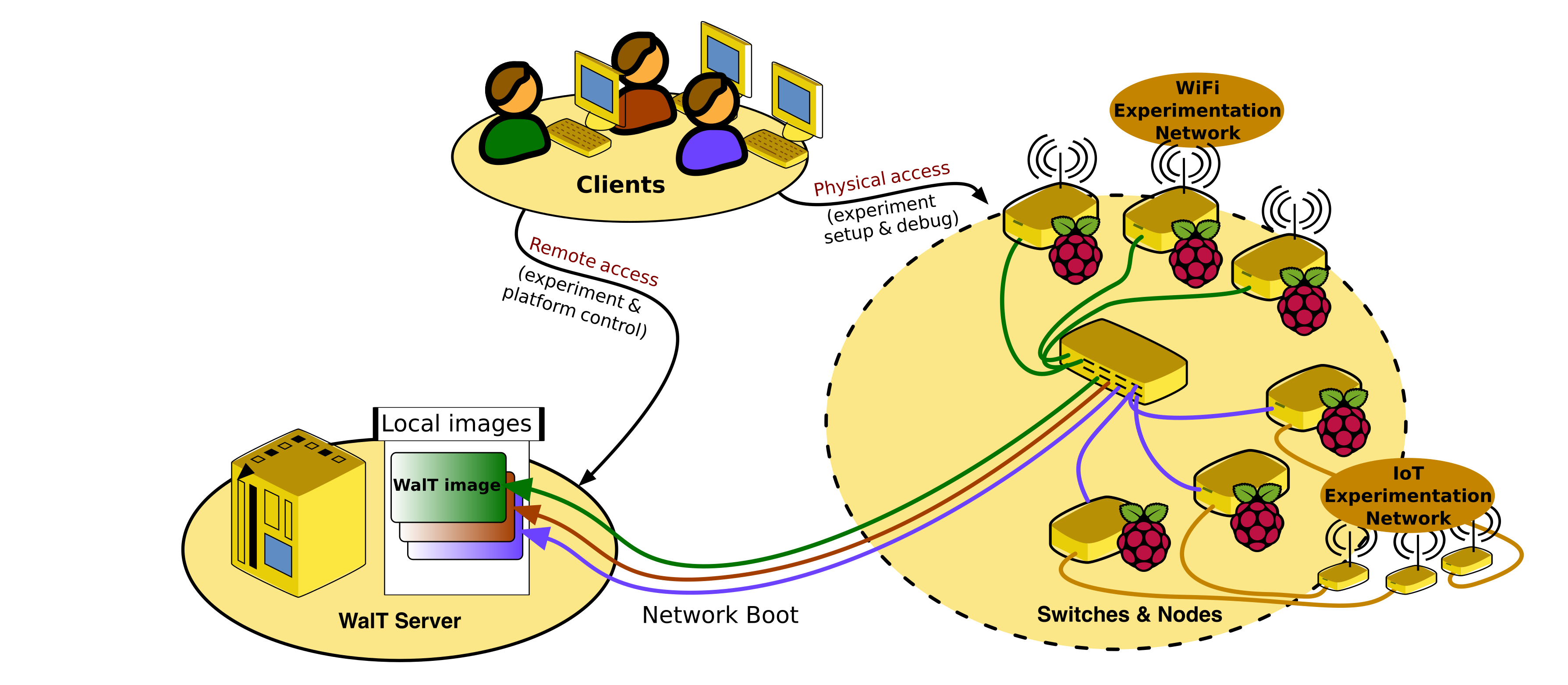
We already had most major concepts in place:
- The combination of
- remote access, for high-level control of the experiment, similar to what we used to get with public platforms such as IoT-lab;
- and physical access, for debugging (e.g., connect a serial link) and fine tuning the experiment (e.g., move nodes, connect IoT boards, etc.).
- The ability to run various kinds of experiments, either using the communication features of the RPi nodes directly (cf. the Wi-Fi experiment on the picture) or by connecting IoT boards on them.
- The use of network boot: deploying an OS image on a set of Raspberry Pi nodes just means updating symlinks on the server to target the selected OS and then sending a reboot request to these nodes.2
We had also decided to make WALT software free and open source. Anyone should be able to build a WALT platform and run new experiments or reproduce experiments of others. But then, if we wanted to make an experiment reproducible, we had to share the OS images we had tuned for it. So the question we were discussing with Franck at the cafeteria was:
Which technology should we use to package and share the OS images?
That day, we selected Docker, mostly because it provides a free-to-use3 cloud platform (i.e., the Docker hub), and because it is storage-efficient4. Moreover, we could obviously rely on the docker ecosystem tools to ease the editing of our OS images (e.g., using Dockerfiles).
At the end of this road, WALT became quite a unique concept, in that it relies on docker for packaging OS images, but it does not use docker for deployment to the nodes!!
Current architecture
The following diagram shows our current architecture (omitting a few things like virtual nodes).
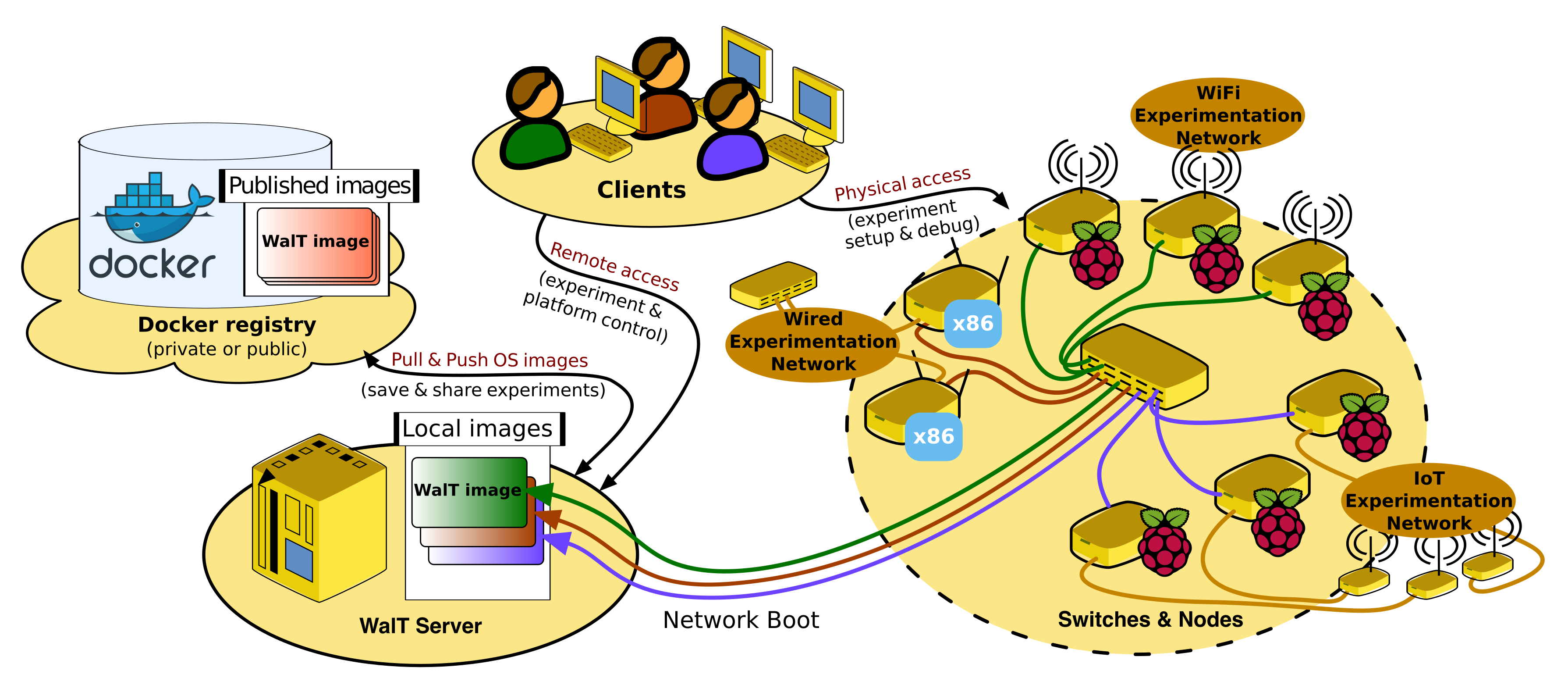
Compared to the previous figure, the main addition is obviously the docker registry5. The idea is that installing a new WALT platform can be seen as duplicating all parts of this architecture diagram except the docker registry, which remains a common part and allows to share experiments between the various WALT platforms.
Comparison with other tools based on Docker
At the root of the Docker ecosystem is a feature of the Linux kernel called linux namespaces. The idea is to isolate some of the processes running in an OS from the others, and obtain a kind of virtualization by isolation. Such a set of isolated processes is called a Linux container. It can be useful for, among other things, improving security, or running two applications on the same system even if they have conflicting software dependencies.
As a result Docker and related tools (podman, kubernetes, etc.) are designed to deploy applications on nodes. Docker images usually contain just what is needed for a single application, such as a web server or a database server.
I recently heard about another software called bootc whose purpose is different: they want to deploy the full OS on nodes. It also relies on the Docker image format, which allows to reuse docker tools to build them (e.g., Dockerfiles). They named this concept bootable containers.
Like bootc, WALT also deploys the full OS on nodes, but then it uses network boot instead of transferring the whole docker image to each node. So this concept could be called network bootable containers.
The following table gives a heavily biased6 view of these tools and their features.
| Docker-like | Bootc-like | WALT | |
|---|---|---|---|
| Docker image format | ✓ | ✓ | ✓ |
| Compatible image tools | ✓ | ✓ | ✓ |
| Image embeds a full OS | ✗ | ✓ | ✓ |
| Access node hardware | ✗ | ✓ | ✓ |
| Access connected devices | ✗ | ✓ | ✓ |
| Lightweight deployment | ✓ | ✗ | ✓ |
| Nodes are stateless | ✗ | ✗ | ✓ |
By deploying a full OS, bootc and WALT give a full control on the node, a very useful feature in a context of network experiments.
Obviously the images are much bigger if they must contain the full OS. However, by using a network boot technique (based on NFS), WALT only transfers the files the node really needs, not the full content of the image. This usually means only 5 to 10 percent of the image size, so the deployment remains light network-wise.
Furthermore, this NFS-based technique prevents having to write the OS image content on the node’s local storage. The local storage of WALT nodes actually remains read-only (so this is obviously the lightest deployment of the comparison storage-wise). And it also means the nodes are stateless, a very important feature for reproducibility.
If the firmware of the node supports network boot itself (Raspberry Pi 3B+, 4B, PXE-capable PC), there is not even a need for a local storage. Just plug a Raspberry Pi board without a SD card on the WALT network, and it will instantly become a WALT node! Here at LIG, and at Schneider Electric, many Raspberry Pi boards are set up like this.
I hope you found this blog story interesting. Now you know what makes WALT special: the physical access to nodes and the mix of docker and network boot technologies! Thanks to Franck Rousseau for proofreading. If you have questions, we can answer you on the mailing list.
-
P.-H. Fröhring, B. Faure, F. Rousseau and E. Dublé. ↩︎
-
The network boot technique has other pros. It allows the SD card of the Raspberry Pi to remain read-only (it just contains a network bootloader). If we were instead repeatedly copying OS images on them, they would break quite frequently (this had been shown by the first prototype). ↩︎
-
Docker hub usage was later restricted for most users, but not for WALT, thanks to the membership in the Docker-Sponsored Open Source Program. ↩︎
-
Filesystem layers present on several Docker images are stored only once on the server. ↩︎
-
Since WALT 9.0, it is possible to use a private registry instead of the docker hub. ↩︎
-
The bias comes from the fact I only selected features useful for a platform such as WALT, designed for running network experiments. The other software were not specifically designed for this, so they have probably done other choices on purpose. ↩︎