The default boot mode of WALT nodes, network boot mode, was described in the previous post. Experience confirms that it is suitable for most experiments. The alternative boot mode we describe below can be used when this is not the case.
Network boot mode: short reminder
Let’s start with a short reminder about the default boot mode of WALT nodes, i.e., network boot mode. Refer to the previous post for more details. As of WALT version 10, the network boot mode can be described by the following figure:
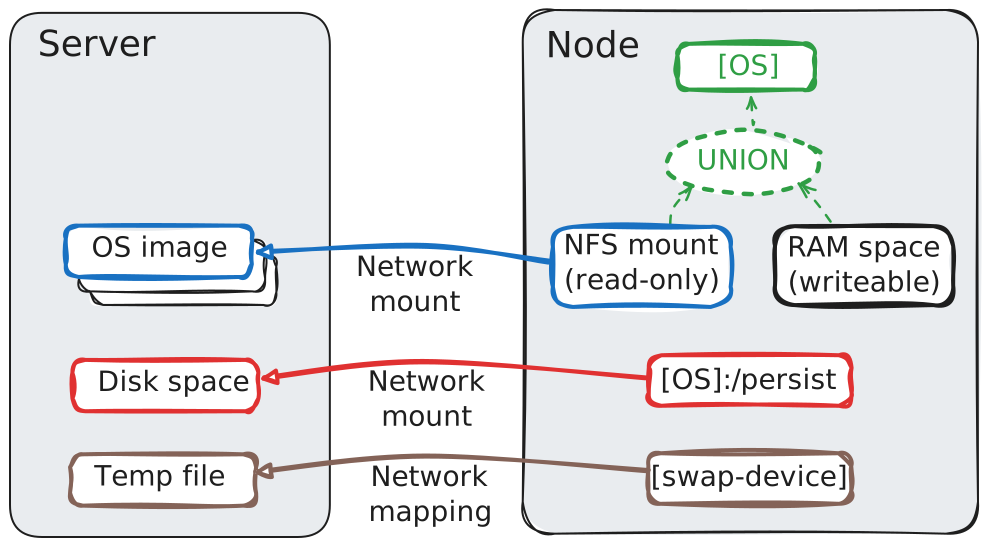
In particular, the OS booted on the node is built of the union of the read-only WALT OS image and writable RAM space. This implies that new and modified files are stored in the RAM space, and lost on the next node reboot.
As explained in the previous post, this behaviour allows a concept of reproducibility at each reboot: the behaviour of the node is only influenced by the OS image content, not by any previous activity.
In most cases, the limited RAM space for storing new files should not be a problem: heavy operations on files should have been applied during the OS image tuning phase, not after booting the nodes. And for edge cases, the swap-on-network feature can act as a safety net. However, when the experiment itself involves heavy operations on files, this behaviour is no longer appropriate.
Description of Hybrid boot
For extending the set of possible experiments, an hybrid boot concept was introduced with WALT 9.0.
With the hybrid boot, the OS relies on the local storage of the nodes. The name “hybrid boot” comes from the fact the first steps of the boot procedure still rely on the network, but then it switches to the local storage.
How it works
When the node relies on hybrid boot, its OS works as described by the following figure:
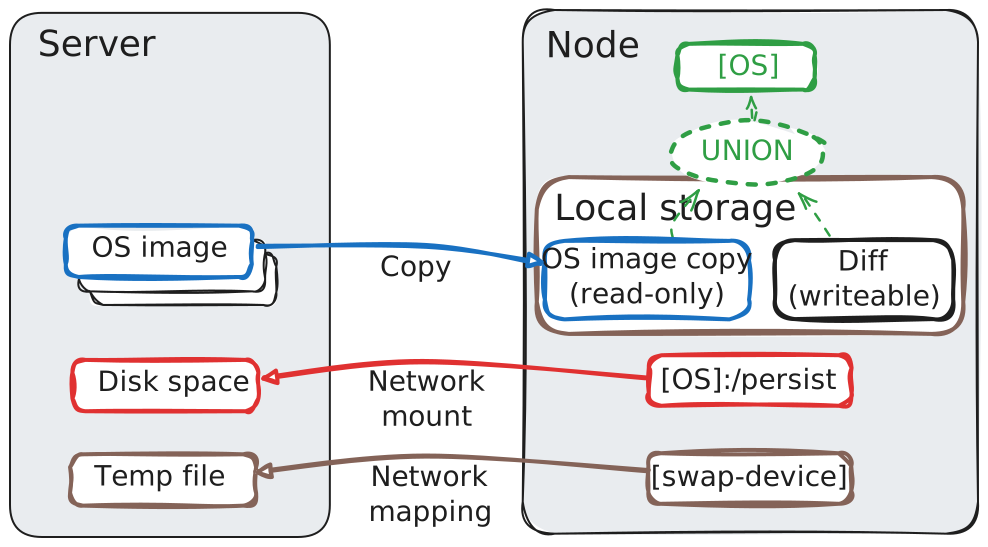
The structure is similar to the network boot mode, but the OS now relies on the local storage of the node.
The first time an OS image is booted on a node, the whole content of the image is copied to the local storage of the node. Obviously, it makes the delay of this 1st boot much longer. The directory called Diff on the figure is also created for storing new and modified files, and the OS is booted on top of that.
Two variants of Hybrid boot exist:
hybrid-volatile: in this case, theDiffdirectory is cleared on each reboot. This allows to preserve the concept of reproducibility at each reboot.hybrid-persistent: in this case, theDiffdirectory is preserved across reboots and file changes accumulate indefinitely over time. The concept of reproducibility at each reboot is not supported by this variant, but a few specific experiments may need this behaviour.
How to enable Hybrid boot
One can activate the hybrid-volatile boot on a node by creating a directory named walt-hybrid at the root of an ext4 partition, on a local disk (or SD card) of the node. The content of the OS images is then stored in this directory, with simple housekeeping rules1.
If an empty file named .persistent is created in this directory walt-hybrid, the boot method switches to the hybrid-persistent variant.
Using virtual nodes, switching to an Hybrid boot variant just means selecting the appropriate template when adding the disk.
Playing with Hybrid boot
Simple test
Let’s check this hybrid boot by creating a virtual node called vnode-hybrid.
$ walt node create vnode-hybrid
Node vnode-hybrid is now booting your image "pc-x86-64-default".
$
Virtual nodes have many handy configuration options. One of these options allows to attach a list of disks and optionally specify disk templates. Here, we want a virtual disk 32G-large and we use the hybrid-boot-v template2, so that the disk is initialized with an ext4 partition and the walt-hybrid directory:
$ walt node config vnode-hybrid disks=32G[template=hybrid-boot-v]
Done. Reboot node(s) to see new settings in effect.
$ walt node reboot vnode-hybrid
Node vnode-hybrid: rebooted ok.
$
Let’s connect to the node, and verify how its OS is set up:
$ walt node shell vnode-hybrid
Caution: changes outside /persist will be lost on next node reboot.
Run 'walt help show shells' for more info.
[...]
root@vnode-hybrid:~# df -h /
Filesystem      Size  Used Avail Use% Mounted on
union            30G  1.5G   27G   6% /
root@vnode-hybrid:~# exit
[...]
The available disk space, 27G, corresponds to the size available for the Diff directory, on the local storage. After partitioning and ext4 formatting, the available disk space was already reduced from 32G to 30G. And since this local storage also stores a copy of the WalT image, only 27G remain.
More elaborate test: Kubernetes over WALT
Running a Kubernetes cluster over WALT nodes is one of the examples where the hybrid boot makes perfect sense. Kubernetes deploys container images to its nodes, and storing these container images in RAM space (as WALT nodes would do with network boot mode) is really not realistic.
Last year I published two images on the docker hub for setting up a Kubernetes cluster, based on k3s, a lightweight distribution of Kubernetes. If you are interested, the Dockerfiles used for building those two images are here and here.
Let us clone them locally:
$ walt image search k3s
User          Image name            Location    Compatibility  Clonable link
------------  --------------------  ----------  -------------  -------------------------------------
waltplatform  pc-x86-64-k3s-agent   docker hub  pc-x86-64      hub:waltplatform/pc-x86-64-k3s-agent
waltplatform  pc-x86-64-k3s-server  docker hub  pc-x86-64      hub:waltplatform/pc-x86-64-k3s-server
$
$ walt image clone hub:waltplatform/pc-x86-64-k3s-server
Image "pc-x86-64-k3s-server" was cloned successfully (cf. walt image show).
$ walt image clone hub:waltplatform/pc-x86-64-k3s-agent
Image "pc-x86-64-k3s-agent" was cloned successfully (cf. walt image show).
$
Image pc-x86-64-k3s-server is enough to turn a WALT node into a single-node Kubernetes cluster. Then with image pc-x86-64-k3s-agent one can add more nodes to this cluster.
Here we will build a cluster with 3 nodes, k3s-server3, k3s-agent1 and k3s-agent2.
Obviously, we have to configure those 3 nodes for hybrid boot.
We also need to enable internet access (i.e., NAT) on these nodes because k3s fails to start without a default route (and later the cluster will probably need to download docker images from the docker hub or elsewhere).
$ for node in k3s-server k3s-agent1 k3s-agent2
> do
> walt node create $node
> walt node config $node disks=32G[template=hybrid-boot-v] netsetup=NAT
> done
[...]
$
Now let’s make them boot the OS images we cloned earlier:
$ walt node boot k3s-server pc-x86-64-k3s-server
Node k3s-server will now boot pc-x86-64-k3s-server.
Node k3s-server: rebooted ok.
$ walt node boot k3s-agent1,k3s-agent2 pc-x86-64-k3s-agent
Nodes k3s-agent1 and k3s-agent2 will now boot pc-x86-64-k3s-agent.
Nodes k3s-agent1 and k3s-agent2: rebooted ok.
$
Let’s connect to k3s-server now:
$ walt node shell k3s-server
[...]
root@k3s-server:~# k3s kubectl get node
NAME         STATUS   ROLES                  AGE   VERSION
k3s-agent1   Ready    <none>                 15m   v1.32.5+k3s1
k3s-agent2   Ready    <none>                 15m   v1.32.5+k3s1
k3s-server   Ready    control-plane,master   20m   v1.32.5+k3s1
root@k3s-server:~#
The cluster is ready! If (like me) you are not familiar with Kubernetes, from there you can try the quick ‘Hello World’ HTTP deployment of Jeff Geerling, for instance.
Last words
We hope you found this blog post about this alternate boot mode for WALT nodes interesting. It opened WALT to quite a large range of new experiments, as shown by the “Kubernetes over WALT” example.
The two examples above both use virtual nodes, because using the disk templates is very handy. But keep in mind that one can also activate hybrid boot on physical nodes, such as Raspberry Pi boards for instance, by creating the walt-hybrid directory on an ext4 partition of the local storage (disk or SD card).
For reference, the documentation about boot modes has all the details.
Thanks to Franck Rousseau and Jérémie Finiel for proofreading. If you have questions, we can answer you on the mailing list.
-
The larger the directory
walt-hybridis, the more images can be saved locally to avoid new network copies. If the remaining disk space is too small for storing the content of a new image, oldest images are deleted (and if the node later has to boot one of those again, a new network copy will occur). ↩︎ -
As you probably guessed, the disk template called
hybrid-boot-vactivates thehybrid-volatileboot variant. Another disk template calledhybrid-boot-pactivates thehybrid-persistentboot variant. ↩︎ -
Note that in the
pc-x86-64-k3s-agentOS image, the node to connect to is hardcoded tok3s-serverin file/etc/systemd/system/k3s-agent.service.env, so the name of this 1st node is important. ↩︎